
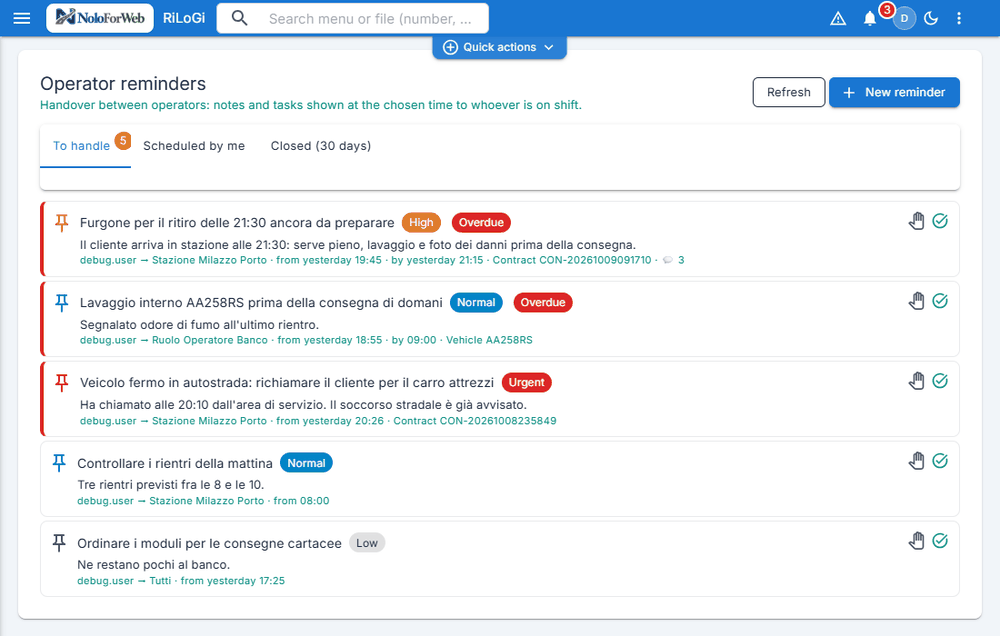
1. The whole shift in one list
Overdue first, then by priority: Urgent in red, High in orange, Normal in blue, Low in grey. From each row you open the linked contract or vehicle, and «I'll take it» or «Done» is one click away.
The van to prepare for 9:30 pm, the cleaning before tomorrow's handover, the customer to call back: every task becomes a reminder with priority, time and recipient, linked to the contract or the vehicle. It has its own chat inside, and the bell at the top alerts whoever is on shift.
Real screens of the rental system, taken in a test environment with made-up data.
Overdue first, then by priority: Urgent in red, High in orange, Normal in blue, Low in grey. From each row you open the linked contract or vehicle, and «I'll take it» or «Done» is one click away.
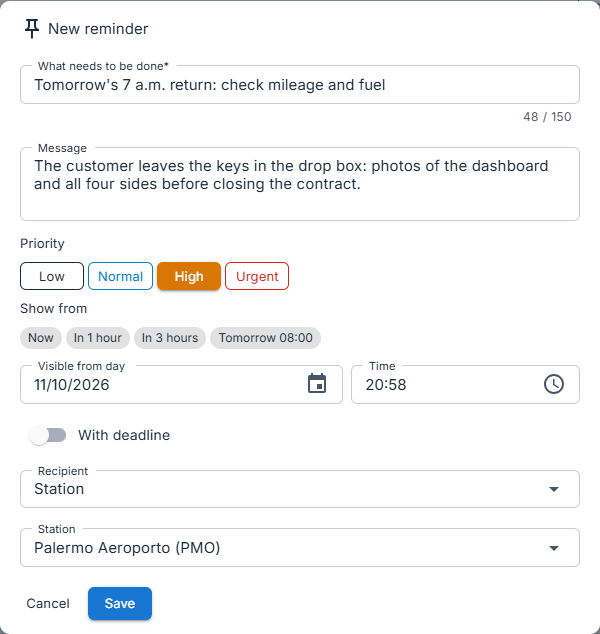
What needs doing, a message, the priority and when to show it: now, in one hour, in three hours or tomorrow at 8. The deadline is optional; the recipient is a station, a role, a colleague or everyone.
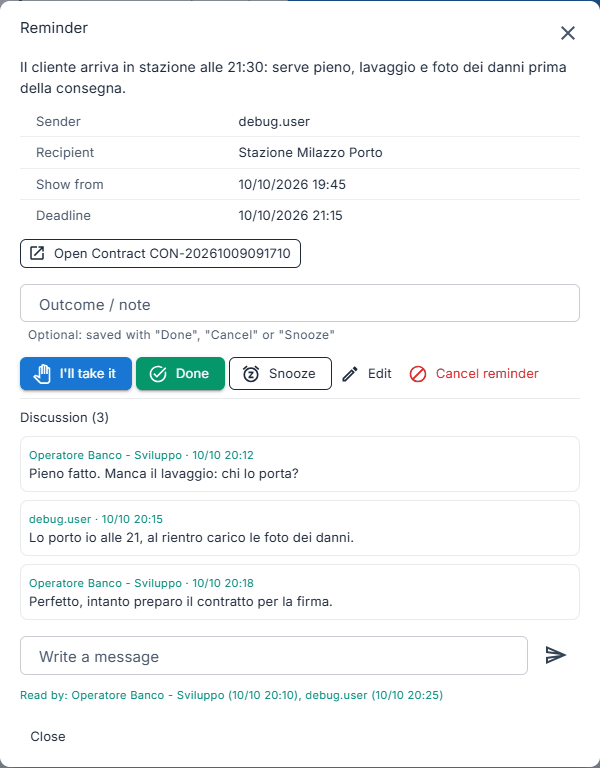
Whoever receives it replies right below: each message carries name and time, and «Read by» shows who opened it and when. The conversation stays tied to the task instead of getting lost in a group.
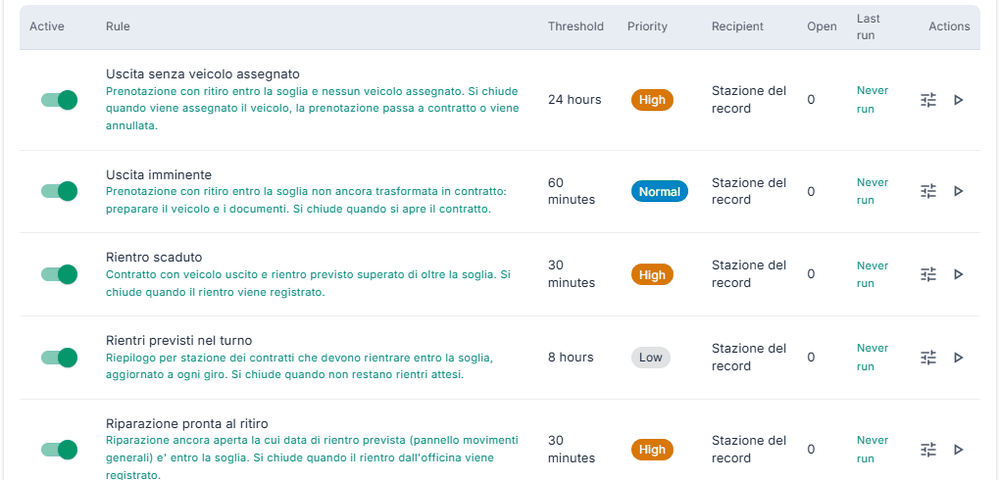
Pick-ups without a vehicle, overdue returns, repairs ready, insurance, road tax and inspection deadlines, balances to collect: the rules create the reminder for the right station and close it when the situation is resolved.
The reminder appears at the set time to whoever should see it, and stays until someone closes it.
The bell shows how many are unread and turns red when something is overdue. A High reminder pops up for 15 seconds; an Urgent one opens a window that only closes with «Acknowledge».
With «I'll take it» the task is yours and colleagues can see it. If someone took it first, the system tells you: no two operators on the same van.
«Snooze» moves it by 30 minutes, an hour, three hours or to tomorrow at 8, and when it comes back it alerts every recipient again. When you close it you can leave an outcome.
Contracts, bookings, vehicles, repairs, technical stops, internal transfers and car transporters have a «Reminders» panel: whoever opens the record sees the handovers about it.
Vehicle assigned, return registered, balance collected: an automatic reminder still open closes by itself; if a colleague took it, it stays with them. A situation already handled does not come back, and on some rules an overdue reminder nobody took goes up in priority.
Author, who took it and who closed it with the time, and who read it are kept. The author cannot be changed, and a deleted reminder can be restored.
No, on purpose: the conversation lives inside the reminder, tied to the task and to the contract or vehicle. They are text messages with name, time and who read them; there are no groups or attachments. The bell refreshes every minute, and the reminder reloads when you open it.
All operators, a station, a role or one specific colleague. For the station, the one you signed in with counts; the administrator sees the reminders of every station.
Pick-up without an assigned vehicle, imminent pick-up, overdue return, returns expected during the shift, repair ready for collection, prolonged technical stop, vehicle deadline (insurance, road tax, inspection, tyres), vehicle arriving at the station, closed contract with a balance to collect and incomplete online check-in.
Yes, the administrator can: for each one they choose whether it is active, the threshold, priority, text, recipient and stations, and «Run now» runs it immediately. From the same page they can reassign or reschedule several reminders at once.
No. They are internal handovers between operators and stay in your company's database; messages to customers go through other features of the rental system.
In a demo we create a reminder at the counter and follow it to the colleague who closes it.
Cookie preferences
Choose which purposes you allow cookies for. Your choice lasts six months on this browser; find and change it via the "Cookie preferences" link at the bottom of every page.
No optional category is pre-selected. Closing the panel without saving is the same as not having chosen.