
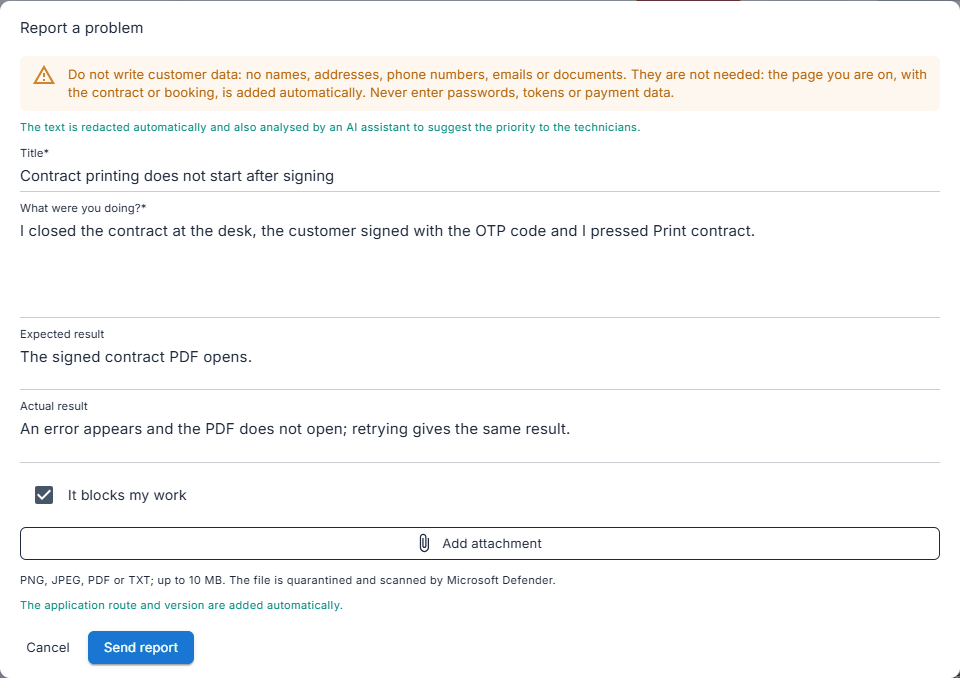
1. Describe what happened
Title, what you were doing, what you expected and what happened. «It blocks my work» marks it as blocking. You can attach an image, a PDF or a text file up to 10 MB.
The «Report a problem» button, at the top of every page, sends a report with the page you are on and the software version, without your customers' data. On the other side NoloForWeb.SupportPlatform receives it: the console where Rilogi's support team analyses it, queues it and follows it through to the fix, every day from 9:00 to 20:00 Italian time.
Real screens of the rental system and of the console, taken in a test environment with made-up data.
Title, what you were doing, what you expected and what happened. «It blocks my work» marks it as blocking. You can attach an image, a PDF or a text file up to 10 MB.
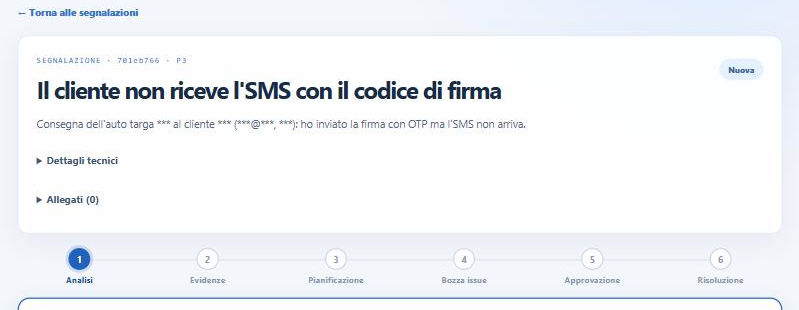
Emails, phone numbers, plates, Italian tax codes, Spanish DNI and NIE, IBANs, card numbers and names after words such as «customer» or «driver» become *** before sending, and again on arrival. Here an example written with made-up data.
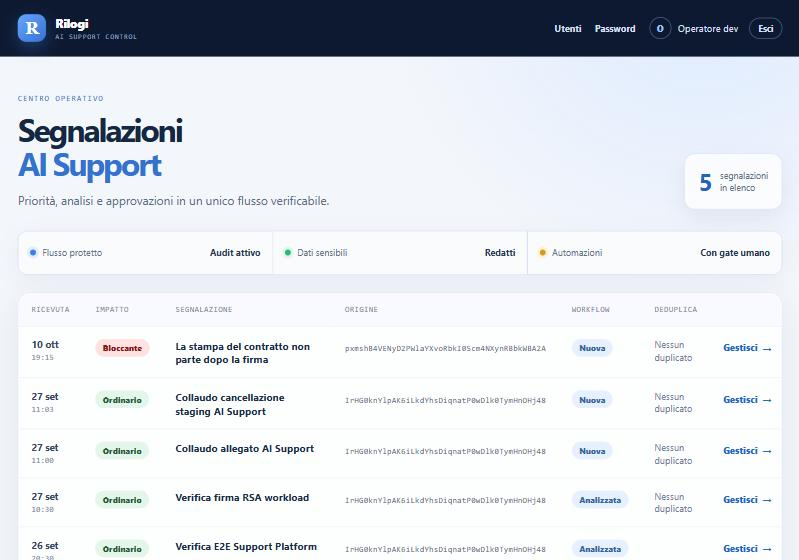
Title, impact and page arrive; the company is shown only as a code. A report identical to another from the last 30 days is flagged as a duplicate.
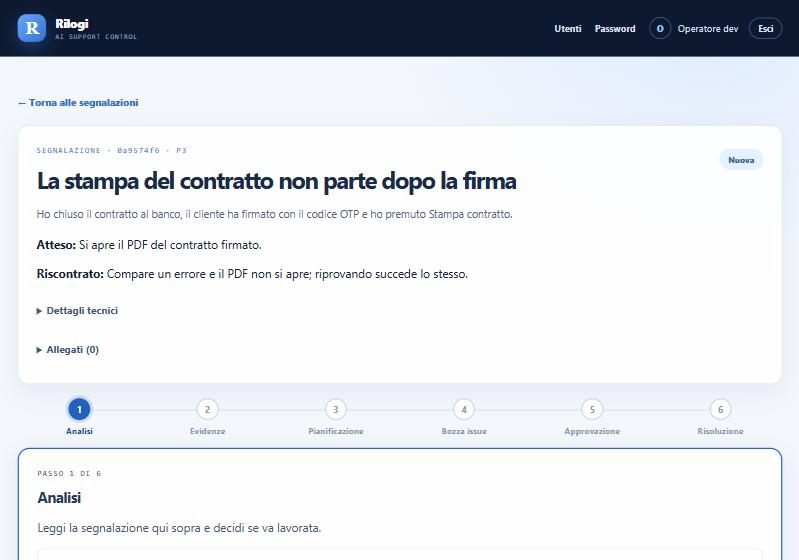
Analysis, evidence, planning, issue draft, approval and resolution. Priority is computed by a fixed rule and confirmed by an engineer.
An application separate from the rental system, with its own database: it collects every company's reports without entering their archives.
Rilogi staff only, with passwords of at least 12 characters and a mandatory TOTP code. After 5 wrong attempts sign-in is locked for 15 minutes.
The file goes into quarantine, its real type is checked and Microsoft Defender scans it: it opens only if clean, and it is deleted after 60 days.
The rental system queues it in its own database and sends it in the background with a short-lived signed token, retrying if the console does not answer, without duplicates.
With AI analysis switched on, Anthropic's Claude proposes category, risk and an issue draft, with no tools and treating the text as data. The answer is masked again before it is saved.
Once approved, the report becomes a GitHub issue; when the issue is closed as completed, the report closes by itself.
Arrival, priority, analysis, attachments and sign-ins go into a log that cannot be changed.
The already masked text, the page of the rental system it came from and the software version. Company and user are replaced by a code; your customer archive and your browser stay out.
There is no need: contract and booking are derived from the page. If one slips in, masking removes emails, phone numbers, plates, documents and names after «customer» or «driver»; a name on its own or an address is not recognised.
A PNG or JPEG image, a PDF or a text file, up to 10 MB. The content must match the declared type, then the file goes through quarantine and Microsoft Defender.
No. The AI assistant only proposes: every fix goes through a person, who approves the issue and the solution.
In a Rilogi database separate from the companies' databases. Attachments are deleted after 60 days.
In a demo we show you a report from the counter all the way to the support console.
Cookie preferences
Choose which purposes you allow cookies for. Your choice lasts six months on this browser; find and change it via the "Cookie preferences" link at the bottom of every page.
No optional category is pre-selected. Closing the panel without saving is the same as not having chosen.